 Bahasa Indonesia
 English
 Universitas Negeri Yogyakarta
Fakultas Vokasi
Kampus 1 :
Jl. Mandung Pengasih Kulonprogo Yogyakarta 55652
Telp./Fax : (0274) 773906 ; 774625
Kampus 2 :
Kepuh, Pacarejo, Semanu, Gunungkidul, Yogyakarta 55893
website http://fv.uny.ac.id
e-mail: fv@uny.ac.id
Instagram: @fvunyofficial
YouTube: @FakultasVokasi-UNY
TikTok: @fvunyofficial
Universitas Negeri Yogyakarta
Fakultas Vokasi
Kampus 1 :
Jl. Mandung Pengasih Kulonprogo Yogyakarta 55652
Telp./Fax : (0274) 773906 ; 774625
Kampus 2 :
Kepuh, Pacarejo, Semanu, Gunungkidul, Yogyakarta 55893
website http://fv.uny.ac.id
e-mail: fv@uny.ac.id
Instagram: @fvunyofficial
YouTube: @FakultasVokasi-UNY
TikTok: @fvunyofficial
Pengajuan SK Aktif Mahasiswa
Student Services
Faculty of Vocational Studies, Universitas Negeri Yogyakarta
Active Student Certificate Application Flow
Step-by-step guide for applying for an Active Student Certificate (for Allowances, BPJS Health Insurance, Scholarships, etc.).
Step 01
Submit Application on UNY E-Service Portal
Students submit an online application through the official portal at eservice.uny.ac.id. Please log in using your SSO account.
Step 02
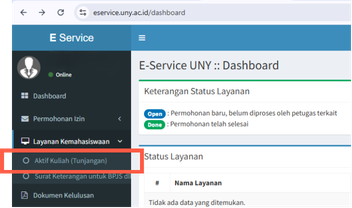
Select Service According to Your Need
On the left navigation bar, select the Student Services (Layanan Kemahasiswaan) menu, then click on the required service submenu (e.g., Active Student for Allowance / BPJS / etc.).
Step 03
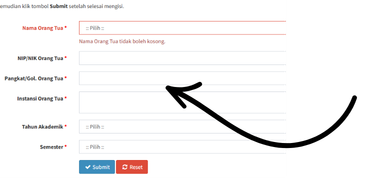
Fill Out the Form & Click Submit
Fill in all required data fields (such as Parent's Name, NIP/NIK, Rank/Grade, Institution, Academic Year, and Semester). Once completely filled out, click the Submit button.
Kontak Kami
Universitas Negeri Yogyakarta
Fakultas Vokasi
Kampus 1 :
Jl. Mandung Pengasih Kulonprogo Yogyakarta 55652
Telp./Fax : (0274) 773906 ; 774625
Kampus 2 :
Kepuh, Pacarejo, Semanu, Gunungkidul, Yogyakarta 55893
website http://fv.uny.ac.id
e-mail: fv@uny.ac.id
Instagram: @fvunyofficial
YouTube: @FakultasVokasi-UNY
TikTok: @fvunyofficial